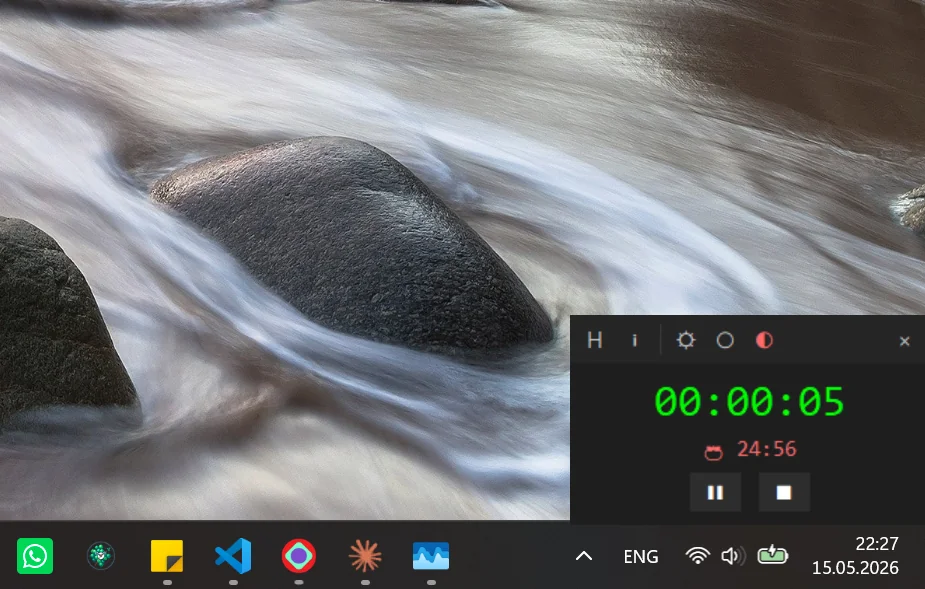
The most 'contagious' time tracker in the wild. Pomodoro mode, minimal interface, Windows.
Grach wasn't looking for an enterprise suite with dashboards and integrations. He wanted one thing: to see how much time a task actually takes — without the tool itself becoming a distraction. Existing Windows options were either bloated, or disappeared into the system tray and got forgotten. You open the tracker — and you've already lost focus.
He just wanted a small, always-visible timer. No frills. No subscription. No three-screen onboarding.
«I don't want to manage the tracker. I want to work — and the tracker can just count.»

We built a minimal time tracker for Windows — it lives on screen, stays out of the way, and never hides. No extra clicks, no interface for the sake of interface.
The team suggested adding the Pomodoro technique: 25 minutes of focus, a short break, a longer one after four cycles. Not because it's trendy — but because Grach was genuinely burning out. The app adapts to any workspace: dark and light themes, adjustable window transparency — so the tracker is visible exactly as much as you need it.
«I installed it for a colleague — she asked if she could share it with the team. That's when I knew we'd nailed it.»
Tell us about your project — we'll respond honestly, no deck with 60 slides.
Start a conversation →